Overview
Instant Countdown Banner is a lightweight, theme‑agnostic WordPress plugin that lets you display a promotional countdown bar at the top or bottom of your site. It’s designed to create urgency and increase conversions during sales or product launches. You can customise colours, messages and call‑to‑action buttons, and preview all changes live before saving
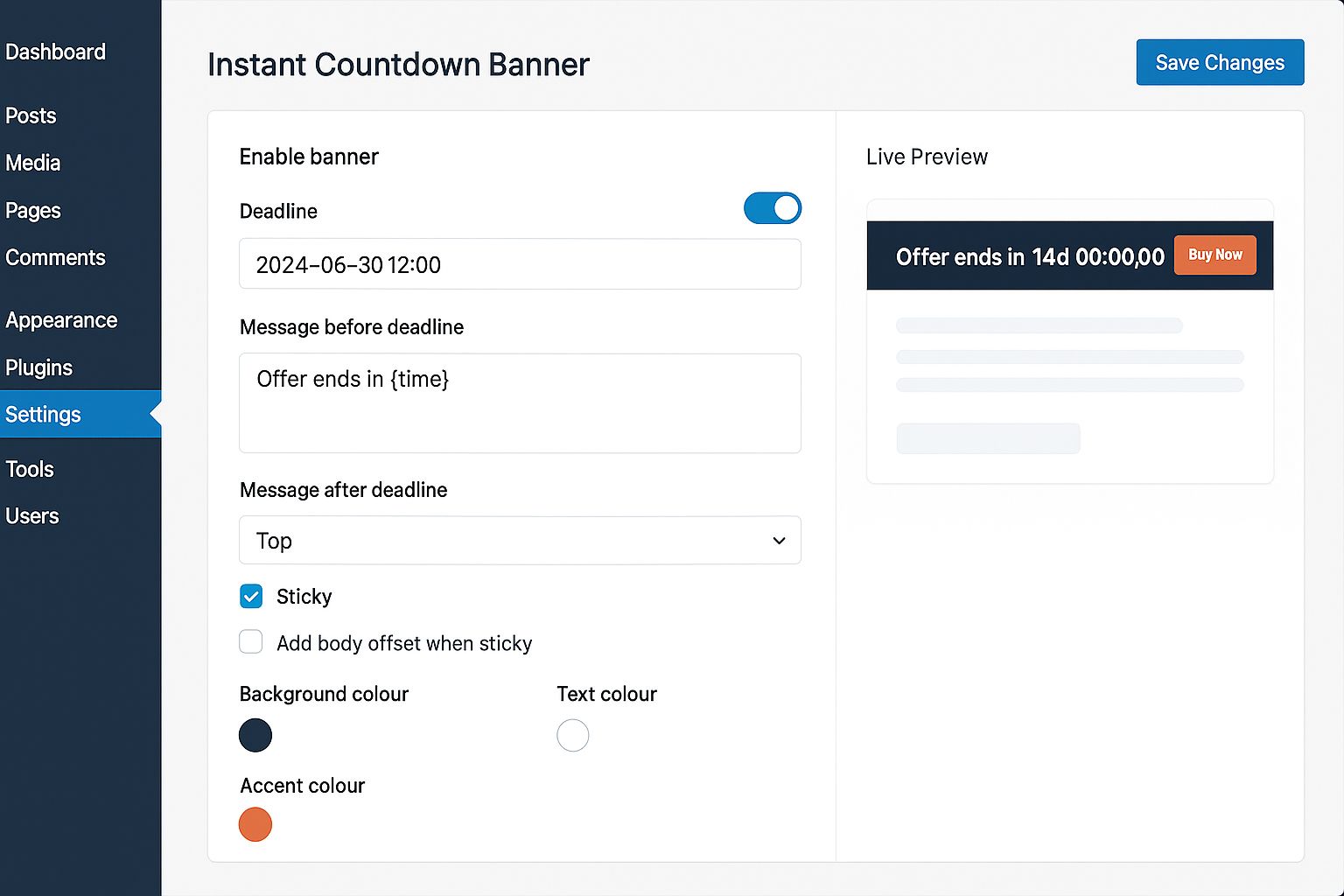
Once activated, go to Settings → Instant Countdown Banner, set the deadline, write messages to display before and after it, choose colours using the WP Color Picker and optionally add a call‑to‑action label and URL. Target specific pages or exclude paths with simple patterns (supports wildcards like *). A live preview lets you see exactly how the banner will look before saving changes.
Usage example
To embed the banner within posts or pages you can use the included shortcode:
[instant_countdown_banner]
The plugin is fully internationalised (a .pot template is included) and follows WordPress coding standards. A clean ZIP of runtime files is provided; development files are excluded.
Features
Top or bottom position with optional sticky mode-
Custom messages before and after the deadline using a {time} placeholder.
Colour controls via the WordPress Color Picker.
Optional call‑to‑action button (label + URL).
Dismiss option with a cookie and adjustable duration; option to hide for logged‑in users.
URL targeting (include or exclude pages/paths; supports wildcards *).
Body offset toggle to avoid overlap on themes with their own padding.
Live preview in the admin page and one‑click copy‑shortcode button.
Fully internationalised (includes .pot file).
Requirements
WordPress version 5.8 or higher (tested up to 6.6).
PHP version 7.4 or higher.
Ability to install and activate plugins; admin access to Settings → Instant Countdown Banner to configure options.
Works with any theme; supports both classic and block editors.
Instructions
Installation & setup
Download the ZIP package from Codester, extract it and upload the instant-countdown-banner folder into your WordPress site's wp‑content/plugins directory. Alternatively, go to Plugins → Add New → Upload Plugin and upload the ZIP directly.
Activate the plugin from the Plugins screen in the WordPress admin panel.
Configuration
Navigate to Settings → Instant Countdown Banner in your WordPress dashboard.
Set the countdown deadline using your site’s timezone.
Enter the text to show before the deadline (you can use {time} to dynamically show the remaining time) and the text to display after the deadline.
Choose whether the banner appears at the top or bottom of the page and whether it should be sticky. Enable or disable the body offset if your theme already handles spacing.
Select your preferred background, text and accent colours using the WordPress Color Picker.
Optionally set a call‑to‑action: enter a label (e.g. Buy Now) and the URL the button should link to.
Choose if the banner can be dismissed and set the number of days the dismissal cookie should hide it.
Under Targeting, decide where the banner should appear. You can include or exclude pages by entering one URL or path pattern per line; wildcards * are supported (e.g. /sale/* or https://example.com/deals/*).
Use the Live Preview pane to see how the banner will look in real time. Adjust settings until satisfied and click Save.
Usage
To insert the countdown bar manually into posts or pages, use the shortcode [instant_countdown_banner]
To show it site‑wide without using a shortcode, simply leave Targeting set to Everywhere.
If the banner doesn’t appear, check that it’s enabled, the deadline is in the future (or enable “Show after deadline”) and that the dismissal cookie isn’t active (try viewing your site in a private/incognito window).