Login ID : admin
Password : admin1234
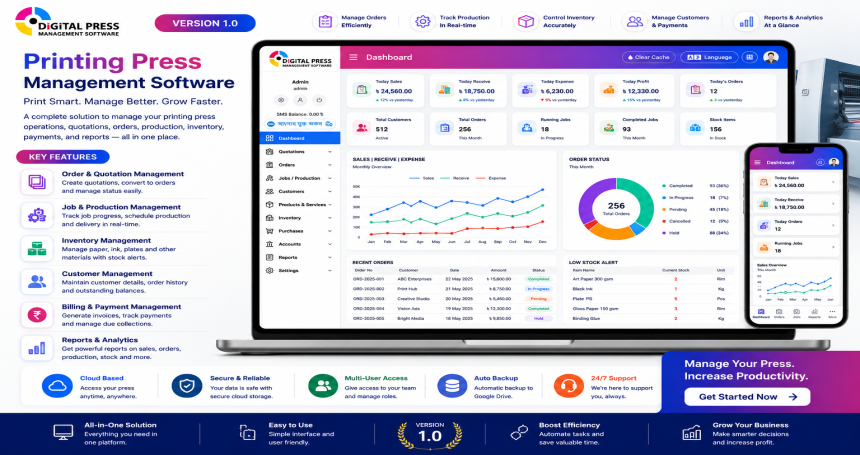
Digital Press Management Software is an advanced business solution designed specifically for digital printing presses to manage and streamline all day-to-day operations. With a modern, intuitive dashboard and powerful features, it offers complete control over sales, accounts, inventory, and customer relationships—all in one place.
This software is ideal for print shops of all sizes aiming to automate processes, reduce manual errors, and gain real-time visibility into their business performance.
Key Dashboard Highlights:
Real-Time Summary Cards: Instantly view daily sales, receivables, expenses, dues, and current balance.
Stock & Inventory Tracking: Keep an eye on current stock values and inventory changes with real-time updates.
Comprehensive Financial Overview: View total sales, receivables, client dues, expenses, and net balance at a glance.
Visual Analytics: Analyze weekly performance trends and total sales distribution through graphs and pie charts.
Core Modules:
CRM Module: Manage client profiles, order history, and communication efficiently.
Accounts & Invoicing: Create, send, and track invoices and payment status seamlessly.
Product Management: Maintain your digital print product catalog with pricing, variants, and descriptions.
Staff Management: Handle staff roles, access permissions, and task allocations.
SMS Notifications: Send automated updates and reminders to clients via integrated SMS features.
Sales & Due Reports: Generate detailed reports for sales performance, receivables, and pending dues.
Key Benefits:
Centralized dashboard for real-time business tracking
Reduces manual errors and streamlines billing
Enhances customer relationship management
Supports multiple languages and user-friendly navigation
Saves time with automated alerts and reporting tools
Features
🖥️ Interactive Dashboard
Real-time metrics for:
Today’s Sales, Receives, Expenses & Balance
Total Sales, Receives, Expenses, Dues & Balance
Client Previous Due & Stock Value
Visual analytics:
Weekly Sales | Receive | Due Chart
Sales Overview Pie Chart
📁 Modular Management
CRM Module: Manage customers, interactions & transaction history
Account Module: Track payments, dues, and account balances
Bill Invoice: Easy invoice creation, tracking & printing
Product Module: Manage printing items, stock, and descriptions
Staff Module: Add and manage employee roles and permissions
SMS Integration: Send order updates, payment alerts, and reminders
Due Reports: View and export customer outstanding reports
Sales Reports: Filterable and exportable sales performance reports
🔐 User & Role Management
Admin panel with full access
Secure login and user-based permission control
🌐 Multi-language Ready
Easy language switching for wider accessibility
⚙️ Utilities & Extras
One-click Clear Cache for performance tuning
Real-time SMS Balance display
Clean, responsive design suitable for all screen sizes
Intuitive left sidebar navigation with collapsible menus
🛠️ Technical Details
Built with modern web technologies
Responsive UI for desktop & tablet
Easily customizable and developer-friendly codebase
📦 What You Get
Full Source Code
Installation Guide
Admin Panel Access
Demo Data for Quick Start
Lifetime Updates
Requirements
To install and run the Digital Press Management Software (Laravel Version) smoothly, your server must meet the following minimum requirements:
🖥️ Server Requirements:
Web Server: Apache / Nginx
PHP Version: PHP 8.0 or higher
PHP Extensions:
OpenSSL
PDO
Mbstring
Tokenizer
XML
Ctype
JSON
BCMath
Fileinfo
GD
cURL
Zip
Database: MySQL 5.7+ or MariaDB 10.2+
📂 Hosting Requirements:
Linux-based shared/VPS/dedicated server (cPanel or equivalent)
Composer (for Laravel dependency management)
PHP CLI access (for running artisan commands)
Minimum 512MB RAM (1GB+ recommended)
🌐 Browser Compatibility:
Google Chrome (Latest)
Mozilla Firefox (Latest)
Microsoft Edge (Latest)
Safari (Latest)
Instructions
Follow these steps to manually install and configure the Digital Press Management Software on your server:
🔽 1. Upload Files to Server
Unzip the downloaded package.
Upload all files inside the source_code/ folder to your server’s public_html or a subdomain directory using FTP or File Manager.
🗃️ 2. Create a New Database
Login to your hosting control panel (e.g., cPanel).
Open MySQL® Databases.
Create a new database, database user, and assign the user to the database with All Privileges.
⚙️ 3. Configure Environment File
Rename the file .env.example to .env.
Open the .env file and update the following lines with your database credentials:
env
APP_NAME="Digital Press"
APP_URL=http://yourdomain.com
DB_CONNECTION=mysql
DB_HOST=127.0.0.1
DB_PORT=3306
DB_DATABASE=your_database_name
DB_USERNAME=your_database_user
DB_PASSWORD=your_database_password
🛠️ 4. Install Dependencies
Requires SSH access and Composer installed on your server.
Connect to your server via SSH.
Navigate to the project root directory.
Run the following command:
bash
composer install
🔑 5. Generate Application Key
Still in SSH, run:
bash
php artisan key:generate
🗃️ 6. Import the SQL Database
Open phpMyAdmin.
Select your newly created database.
Import the SQL file located at: database/import/digital_press.sql
🧹 7. Run Migrations & Clear Caches
(Optional, if database is not pre-built)
php artisan migrate --seed
php artisan config:clear
php artisan cache:clear
php artisan config:cache
🔐 8. Login Credentials
Visit: http://yourdomain.com/
Use default admin login:
Email: admin@example.com